
19.2 Patient Management |
|
Access Rights
|
New
|
Edit
|
View
|
|
Manage Patients
|
Enroll patients to the study
|
Modify existing patient study data
|
View patient study data
|
|
View Complete Patient Data
|
N/A
|
N/A
|
*View the forms linked to the study (patient or study form)
When this right is provided, the View right must be provided for Study Setup / Notifications / Admin Schedule / Combined Budget as well
|
*What is Complete Patient Data / Information?
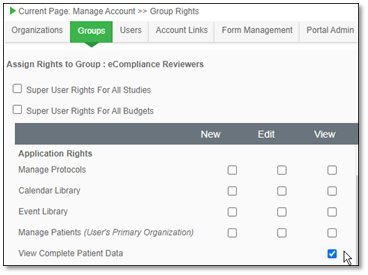
This is an additional security feature provided for the Velos eResearch user. While defining user access rights, you may specify if that specific study team member should be able to view patient identifiable fields or not. 'Complete Patient Information' includes certain pre-determined data fields that, if hidden from the viewer, would make it impossible to identify the patient unless they are aware of the patient identification code. Although some, or all, of these fields are captured while registering a patient to the system, the user who does not have access rights to view these fields will not be able to do so.
The following fields will be hidden from a user who does not have access to view 'Complete Patient Information':
▪ First Name
▪ Middle Name
▪ Last Name
▪ Date of Birth
▪ SSN
▪ Registration Date
▪ Address
▪ City
▪ State
▪ Zip/Postal Code
▪ Country
▪ Phone Number
▪ Email
▪ Age
If a user does not have access to 'Complete Patient Information' but has still been given the right to manage patients, he/she will be able to view the following patient information:
▪ Patient ID
▪ Gender
▪ Marital Status
▪ Blood Group
▪ Ethnicity
▪ Organization to which the patient is registered
▪ Registered by
▪ Status (Active/ Inactive)
▪ Employment
▪ Education
▪ Study Enrollment details/Patient Schedule/Patient Reports - without any patient identifiable fields
|
|