
5.3 Settings |
Within Velos eResearch, users have the option to specify the automatic logout time for their account, and to select their default landing page. The Automatic Logout Time feature protects the privacy and security of the user’s account by logging them out automatically after a period of inactivity.
|
Note:
|
1. Users can change their automatic logout time if not restricted.
2. Logout time is displayed in minutes and can range in time from 15-300 minutes.
3. Settings changed on the Settings page affect only your account.
|
In addition, each user has the option to define the default landing page for their functional role. For example, a finance user may prefer to have the Budgets page as their default landing page instead of My Homepage.
To access the Settings page:
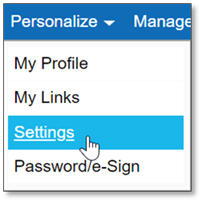
1. Click on the Personalize menu and select Settings.
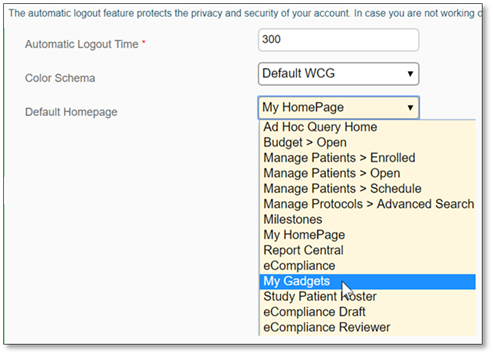
The Settings page displays:

2. Change the automatic logout time for your account by replacing the value (in minutes) in the Automatic Logout Time field.

-OR-
If you would like to only, or also, change the default landing page for your account, select the appropriate option from the Default Homepage dropdown menu. For more information on Homepage options, refer to Homepage Options.
3. After making the desired changes, enter your e-Signature and click Submit to confirm.

The account setting changes have been saved.
|
Note:
|
For any account setting changes to take effect, you must first log out and log back into Velos eResearch.
|
|
|