
8.5.1 Study Dictionaries/Settings |
Within the Study Dictionaries/Settings permissioned users can define and modify the Adverse Event Dictionary and the how Patient Study IDs will be generated.
|
Enterprise Only:
|
The Adverse Event Dictionary is an eResearch Enterprise only feature.
|

To define Study Dictionaries/Settings:
1. From the Study Setup tab, select the View/Edit Dictionaries and Settings link.

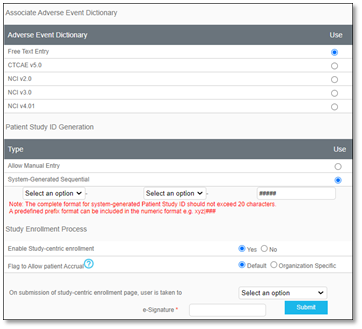
A Dictionaries and Settings window will display.
|
Options
|
Description
|
|
Adverse Event Calendar
|
Users may define by selecting a radio button for the appropriate dictionary for the study. [Enterprise Version only]
|
|
Patient Study ID Generation
|
Users may define if the Patient Study ID Generation will Allow Manual Entry or be System-Generated Sequential.
▪ If System-Generated Sequential was selected, the format may be further defined by selecting from the two dropdowns as either Study or Site ID, and the default hash tags may be increased or decreased in number, if needed. For example, a system-generated patient study ID may appear in the format as Study-Site ID-###.
|
|
Enable Study-centric Enrollment
|
Users may keep the default No, or, if changed to Yes, study-centric enrollment will be permitted, and the Add New Patient button will be functional in the Enrollment tab for patient management.
▪ For Yes, the Select an option dropdown may be clicked and a patient location or form may be selected as the landing page a user will be taken to after adding a new patient from the Enrollment tab.
|
|
Flag to Allow Patient Accrual
|
Users may keep the Default option to Flag to Allow for patient Accrual or they may select the radio button to change the option to Organization Specific. Hover over the question mark to view more information.
|