
11.3 Dashboard |
Velos eResearch Enterprise provides a means to monitor and perform data management activities for a study using the Dashboard tool. The Dashboard tool allows permissioned users to monitor key data in the following three areas:
▪ Form entries
▪ Adverse events
▪ Patient study status
The Dashboard tool allows permissioned users to review data entries, open queries on specific data-entry fields, correct data, and resolve open queries.
|
Enterprise Only:
|
The Dashboard tool is only available in the Enterprise version of eResearch.
|
To access the Dashboard tool:
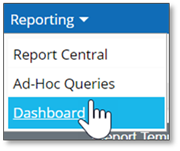
1. Click the Reporting menu and select Dashboard.
The Dashboard tool displays:
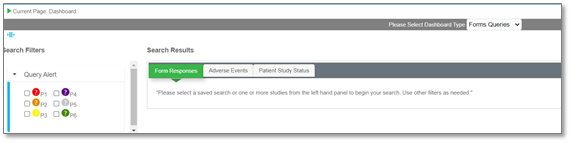
a. If you do not see all columns shown in the above image, or if you wish to add or remove columns in your view, click Show/Hide Columns.
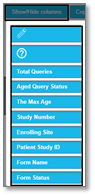
b. Then click each applicable header name in the dropdown to add or remove headers from the table as needed.
|
|