
10.2.2.1 Example Milestone
Below is an example of a patient status milestone. This is only one example of the many possible milestone configurations but can serve as a reference for how one might construct a milestone based on protocol/contract requirements.

|
Ref #
|
Element
|
Description
|
Example
|
|
1
|
Milestone Type: Patient Status
|
Indicates the type of milestone being configured.
|
This example is a Patient Status type milestone, so it listens for changes in status for patients on this study to the target status (see Patient Status below)
|
|
2
|
Patient Count: 5
|
Indicates the total number of patients that are needed to meet the status conditions set in this milestone to equal 1 financial achievement on the study. Any milestone that has a patient count > 1, might also be referred to as a “compound” milestone rule.
|
In this milestone example, 5 patients must be associated with the configured target status (see Patient Status below) on this study to equal 1 financial achievement
|
|
3
|
Patient Status: Screen Failure
|
Indicates the target status for this milestone.
|
In this milestone example, a patient must be assigned the patient study status of “Screen Failure” to meet this condition of this milestone
|
|
4
|
Payment Type: Receivable
|
Indicates the type of financial achievement line item generated by this milestone. Default options include: Invoiceable, Payable, or Receivable.
|
In this example, each financial achievement realized by the conditions of this milestone will be receivable line items.
|
|
5
|
Payment Amount: 250.00
|
Indicates the amount that each financial achievement generated by this milestone is worth.
|
In this example, each financial achievement realized by the conditions of this milestone will be worth $250.00
|
|
6
|
Holdback: 3.20%
|
Indicates the holdback amount of the Payment Amount to be separated as a holdback line item. Holdback is always a percentage of Payment Amount.
|
In this example, each financial achievement realized by the conditions of this milestone will have a holdback amount of 3.20% of the total payment amount.
|
|
7
|
Limit: 5
|
Sets a limit on the number of financial achievements that this milestone rule can generate. If this field is left blank, this milestone rule has no limits on the number of financial achievements it can generate.
|
In this example, this milestone rule can generate no more than 5 achievements.
|
|
8
|
Payment For: Investigator
|
Informational tag used to indicate who should receive the payments as the result of financial achievements generated by this milestone rule. Default options include: Investigator, Coordinator, Sponsor, and Patient.
|
In this example, the payments are for the investigator.
|
|
9
|
Date Range: 03/15/2022 – 12/14/2022
|
The Date From and Date To fields can be used independently or together to define date ranges that this milestone will monitor for status changes.
|
In this example, only patient status changes that occurred between the dates of 03/15/2022 – 12/14/2022 can be counted towards a financial achievement. If they fall outside of that range, but otherwise match the remaining criteria, they will be ignored.
|
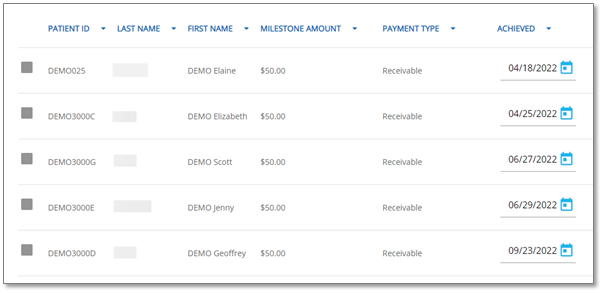
As noted above, the configuration of the milestone above requires 5 patients who have screen failed on this study and meet the rest of the requirements of the milestone to equal 1 financial achievement. Below is an example of how this would look on a study where this milestone was achieved from the View/Delete Achievements tool.

|
Note:
|
It’s possible to change the achievement date of any milestone achievement from this page if not used in an invoice or reconciliation. See View/Delete Achievements for more information.
|