
9.4 Schedule Tab |
The patient schedule tab defaults to schedules on today’s current date. All studies’ visits will be viewed, as per the selection made in the Visits dropdown for those studies that your organization(s)/ study team access allows.
Using the Schedule tab may assist in planning for current and upcoming patient visits or when personnel may be out of office and another user will need to perform their duties. This is a good option for a default homepage for study coordinators.
Schedule information can be searched by past, current, and future dates, as per the selections below.
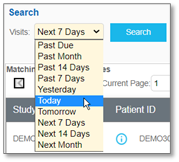
After selecting from the Visits dropdown and clicking Search, the applicable data will appear in a table. Continue to the next page for more information.
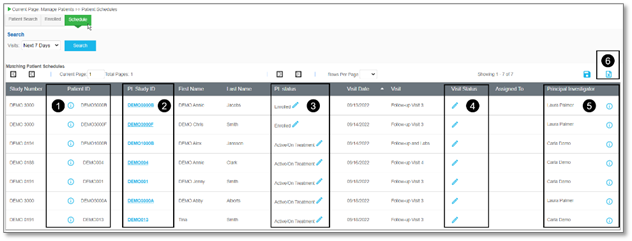
View the diagram below for details on the functionalities of the Schedule page.
|
Number
|
Feature Name
|
Description
|
|
1
|
Information – Patient ID
|
Used to access the Demographics page for a patient record. Click the i in the Patient ID column for a specific study patient record. For more information, refer to Manage Patient Demographics.
|
|
2
|
Pt. Study ID
|
Used to access the Schedule page for a study patient record. Click a link in the Pt. Study ID column for a specific study patient record. For more information, refer to Patient Schedules.
|
|
3
|
Edit – Pt. Status
|
Used to access the Screening/Enrollment page for a study patient record. Click Edit in the Pt. status column for a specific study patient record. For more information, refer to Screening/Enrollment.
|
|
4
|
Edit – Visit Status
|
Used to change the date for selected visit(s) / event(s) for a specific study patient record. Click Edit in the Visit Status column, in the pop-up, use the Search fields to filter, then select checkboxes for the applicable visit(s) and / or event(s). Select the appropriate Status field dropdown(s), add Status Valid From date(s), e-Sign, and then click Submit.
|
|
5
|
Information – Principal Investigator
|
Used to view a PIs email address. Hover over the i in the Principal Investigator column for a specific study patient record.
|
|
6
|
Export to Excel
|
Used to download a spreadsheet of the table data. Click Export to Excel for a specific study patient record.
|
|
|